DP-06: Client timeout trying to install
This error shows that there is an issue with preparing the target directory for installation. This can be due to a number of reasons, including user permission issues that may be preventing read/write access to the installation directory.
Run the Epic Games Launcher as an Administrator. Refer to How do I run the Epic Games Launcher as an Administrator?
Confirm you have read/write access to the folder.
Navigate to your selected install location.
Right-click and select Properties.
Select the Security tab.
Select your username in the Group or user names box.
Verify that there is a check under Allow beside both Read and Write in the Permissions box.
If you do not see Read and Write checked in the Permissions box, click Edit on the bottom right.
Check Allow on both Read and Write.
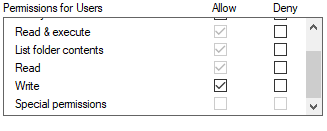
Click Apply, then OK.
Change the game installation path to a different drive.