How can I purchase V-Bucks on Fortnite iOS?
- Open Fortnite and go to the V-Bucks tab.
- Select the amount of V-Bucks you want to purchase.
- You will be automatically directed to complete your purchase.
Note: If purchasing in the US you will be prompted with a choice for your payment. See image below.
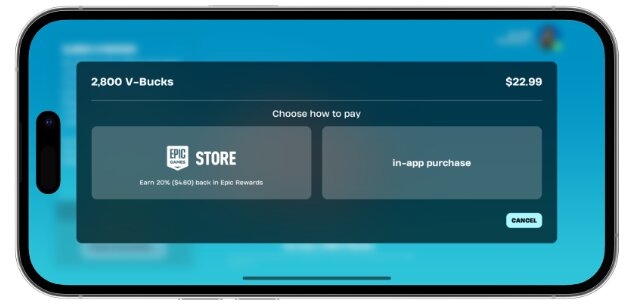
Epic Games Store: If you choose this option, your purchase and payment will go through the Epic Games Store platform
In-App Purchase: This option would make the payment go through the Apple App Store. For issues related to purchases through this option, please reach out to Apple Support team (Opens in a new tab) - Follow the on-screen prompts to complete your purchase.
- After your order is confirmed; you can click the button to get back to Fortnite.